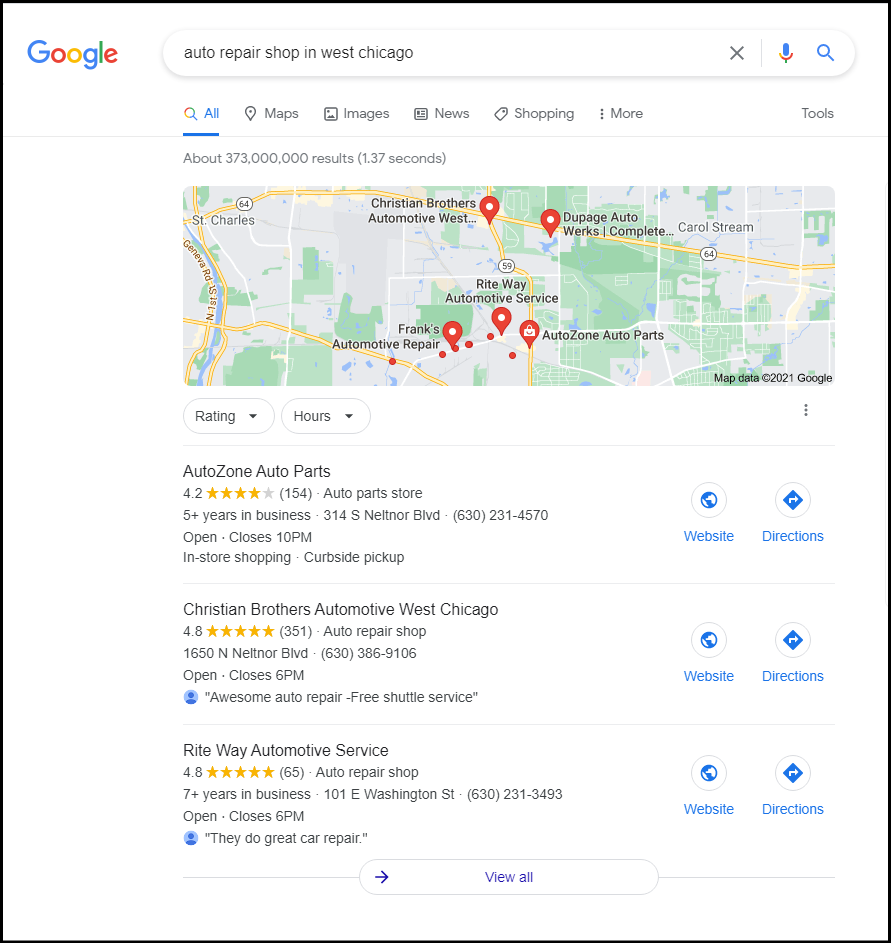
Getting your auto shop or auto-related business on Google isn't optional in 2026—it's essential. This guide is for owners and managers of auto shops, garages, and auto-related businesses who want to improve their visibility and attract more customers through Google. A strong Google presence is now the primary way customers discover and choose local auto businesses. With over 60% of local searches now influencing AI-generated responses and the majority of mobile users seeing Business Profiles before traditional websites, your Google presence directly determines whether potential customers find your garage, repair shop, parts supplier, or competitor.
This guide walks you through everything from initial setup to advanced optimisation, giving you practical steps to turn Google searches into real customers driving through your doors.
Get your auto business on Google in 3 quick steps
Any local auto business can appear on Google Search and Maps within one day of initial setup. Whether you run a car repair garage in London, an auto parts store in Manchester, or a detailing service in Dublin, the process is straightforward and completely free.
Step 1: Sign in and start your profile
- Navigate to google.com/business or simply search "Google Business Profile" in your browser.
- Sign in with a Google Account dedicated to your auto business rather than a personal account. This keeps things professional and makes ownership transfer easier if you ever sell the business or bring on a partner.
Step 2: Enter your business details
- Input your auto business name exactly as it appears on your signage and legal documents.
- Select your primary category from Google's predefined list—options like "Auto Repair Shop," "Car Wash," or "Auto Parts Store" work better than generic terms. Categories describe your business and connect you to customers searching for your services. You can also add up to 10 secondary categories to further specify your offerings.
- Enter your physical address for storefronts, or define your service area (up to 20 zones) if you offer mobile mechanic services.
- Save your draft profile.
Step 3: Verify ownership
- Choose your verification method. Most bricks-and-mortar locations in the UK and EU still receive a postcard containing a 5-digit code within 3–7 days, though some businesses qualify for instant phone or email verification.
- Once you enter the code, your profile goes live.
| Verification Method | Typical Timeline | Notes |
|---|---|---|
| Postcard | 3–14 days | Most common for physical locations |
| Phone | Instant | Available for eligible businesses |
| Instant | Available for eligible businesses | |
| Video | 1–3 days | Used for some regulated industries |
After verification, your auto business can show on Google Search and Maps for relevant local queries like "car repair near me" or "auto parts in Dublin."
Definition: A Business Profile is your business's public listing on Google Search and Maps, displaying your name, address, phone number, hours, photos, and reviews.
Why your Business Profile on Google matters for auto businesses
A Business Profile on Google transforms passive searchers into active customers by displaying key information—your name, star rating, address, hours, phone, photos, and reviews—directly in search results and on Maps. Customers don't need to visit your website to call you or get directions.
Real search scenarios for auto businesses
Consider these real search scenarios for auto businesses:
- "Emergency car repair London 24/7" – A complete profile with a 4.8-star rating, 24-hour badge, and prominent call button wins the job.
- "Car wash Amsterdam" – Photos of sparkling clean vehicles, service menus, and clear directions convert searchers into clients.
- "Mobile mechanic Manchester" – Service area details and recent positive reviews build trust before the first phone call.
- "Auto parts near me" – Inventory photos and opening hours help customers plan their visit.
Research shows that complete profiles secure 7x more clicks than incomplete ones. On mobile devices, profiles often appear before traditional websites for 46% of local searches, making them crucial for auto shops and related businesses.
Definition: The local pack is the group of top three business results shown for local searches on Google. Learn how to rank in it with our guide to the Google Map Pack [blocked].
The core profile delivers 100% free organic visibility. Unlike Google Ads campaigns where you pay per click (averaging £1–£5 in competitive UK markets), your Business Profile costs nothing to create, maintain, or use. Ads can complement your profile for high-value terms, but only you decide whether that investment makes sense for your auto business.
Free tools Google gives your auto business
Google's local tools cost nothing to set up and form the foundation of any digital presence in 2026.
What you get at no cost:
- Google Business Profile dashboard for centralised management
- Google Maps placement with pin visibility and "near me" discoverability
- Google Search appearances in the local pack (the top three results for 40% of mobile queries)
- Google Reviews system aggregating star ratings that influence 88% of purchase decisions
- Built-in analytics tracking views, calls, and direction requests
An auto repair shop launched in March 2025, for example, gained its first customers solely from Maps directions and calls—generating £2,500 in monthly revenue without any marketing budget.
There are no monthly platform fees for appearing on Search and Maps. Optional paid extras exist, such as Google Ads campaigns for increased visibility or Google Workspace (£5/user/month) for professional email, but these remain entirely optional.
Set up and claim your Business Profile for your auto business
Claiming your profile prevents incorrect public listings and gives you full control over every detail customers see.
Unclaimed profiles can appear automatically when customers upload photos or leave reviews. In 2024, a mobile mechanic in Brighton lost potential customers due to an unclaimed listing with incorrect hours until the owner claimed and corrected the profile.
How to claim your profile
- Search your auto business name on Google or tap your location in Google Maps.
- Click "Own this business?" or "Claim this business."
- Follow the prompts to verify ownership.
- Complete verification via postcard, phone, email, or video.
Required information fields
- Legal business name (matching your signage)
- Primary category (and up to 10 secondary categories)
- Physical address or service area
- Phone number (local numbers perform better for SEO than toll-free)
- Website URL
- Primary business language
- Opening date
| Verification Method | Typical Timeline | Notes |
|---|---|---|
| Postcard | 5–14 days | Most common for UK and EU locations |
| Phone | Instant | For eligible businesses |
| Instant | For eligible businesses | |
| Video | 1–3 days | For some regulated industries |
Verification timelines vary. Some industries—healthcare, financial services, regulated professions—may trigger extra checks or video verification.
Important: Use your official brand name without keyword stuffing. Names like "Best Cheap Car Repair London 24/7" violate Google's guidelines and risk suspension. Google suspended 5 million profiles in 2025 for such violations.
Definition: NAP stands for Name, Address, and Phone number, and consistency across the web is critical for local SEO [blocked].
Definition: Primary and secondary categories describe your business and connect you to customers searching for your services.
Personalise your profile so it reflects your auto business brand
Personalisation improves both click-through rate and trust because customers see a real, active business rather than a generic listing. Profiles with strong visual branding see 35% higher engagement.
Elements to customise
- Logo – Upload as your profile image
- Cover photo – Feature your garage, team, or signature service
- Interior and exterior images – Add 20+ high-resolution photos showing the real experience
- Service photos – Update quarterly with seasonal or promotional offerings
- Business description – Write 250–750 characters covering your story
Sector-specific examples
- An auto repair shop uploads photos of repairs and diagnostics equipment
- A car wash adds before-and-after vehicle photos and pricing menus
- A parts supplier includes images of popular products and brands stocked
Photo best practices
- Use high resolution (minimum 720p)
- Ensure good lighting—natural light works best
- Avoid heavy filters or stock imagery
- Update at least every quarter
Writing your description
Mention your location, main services, unique selling points, and founding year. For example: "Family-run auto repair garage in Berlin servicing all makes and models since 2012, specialising in hybrid vehicles and MOT testing." Weave in local keywords naturally—this can boost local SEO visibility by 25%. For a full guide on profile optimisation, see our post on Google Business Profile optimisation [blocked].
Manage, edit and keep your auto business information up to date
Outdated hours or contact information directly cause lost sales and negative reviews. A garage that moved premises in 2025 but forgot to update its address received a flood of 1-star reviews from frustrated customers who couldn't find the new location.
How to edit your profile
After verification, you can edit your profile directly from Google Search or Google Maps by searching your business name while logged into the correct Google Account. On mobile, simply tap your business listing to access editing options.
Common edits
- Changing opening hours (including holiday hours for Christmas Eve, New Year's Day, bank holidays)
- Updating phone number or website URL
- Adding new services or products
- Marking the business as temporarily closed
Most edits go live within minutes. However, some changes—particularly to your name, category, or address—may be reviewed by Google for accuracy and can take 24–48 hours.
Maintenance schedule
Set a monthly or quarterly check to confirm all information remains accurate. This is especially critical for seasonal auto services like winter tyre fitting or summer air conditioning checks where hours change dramatically throughout the year.
Before and after scenario
A garage extends Saturday hours in September 2026, updating the profile immediately. Over the following weeks, the "busy times" data adjusts based on actual customer visits, helping future customers plan their visits.
Easily connect with customers on Google
A Business Profile isn't static—it functions as a communication channel with potential and existing customers.
Posting features
Create updates, offers, events, and service highlights directly from your profile. Examples include:
- "10% off winter servicing – valid 1–30 November 2026"
- "New evening MOT appointments starting Monday"
- "Summer tyre change special – weekend only"
Responding to reviews
Reply to both positive and negative reviews using polite, professional language. Aim to respond within 24–48 hours. Auto businesses that consistently respond to reviews see their average rating increase by 0.2–0.5 stars. For guidance on handling difficult feedback, see our guide on managing negative reviews [blocked].
Example response to a positive review:
"Thank you, Sarah! Thrilled our quick brake repair got you back on the road. Visit again soon for your next service!"
Messaging features
In supported regions, customers can message your business directly from the profile. Set clear expectations about response times in your messaging settings to avoid frustration.
FAQ section
Answer common questions proactively:
- Parking availability and nearest car parks
- Loan car or courtesy vehicle policy
- Mobile service area coverage
- Accepted payment methods
This reduces repetitive enquiries by up to 20% while improving the customer experience before they even contact you.
Know how customers find your auto business on Google
The built-in insights in your Google Business Profile show exactly how customers discover and interact with your listing, guiding smarter marketing decisions.
Key metrics available
- Number of views on Search and Maps
- Types of queries used (e.g., "car repair near Leicester Square")
- Calls made directly from your profile
- Direction requests
- Website clicks
Using insights practically
- If most calls come after 6 p.m., consider extending evening hours
- If many direction requests originate from out-of-town postcodes, add parking details and transport information
- If YouTube or video content drives traffic, consider adding more videos to your profile
Compare month-to-month data around key dates—Black Friday, Christmas, local festivals, school holidays—to plan staffing levels and promotions. An auto shop noticing a 40% spike in direction requests during December can prepare for increased footfall.
These insights complement tools like Google Analytics on your website, helping you build a complete picture of customer behaviour from first search to final purchase.
Optimise your profile for local SEO on Google
Optimising your Business Profile is a core component of local SEO [blocked], directly influencing your rankings in the "local pack" and on Maps.
Keyword optimisation
Include relevant phrases naturally in your business description and services list:
- "24-hour auto repair in Birmingham"
- "Child-friendly car service in Barcelona"
- "Mobile mechanic covering Greater Manchester"
NAP consistency
Ensure your Name, Address, and Phone number match exactly across your Business Profile, website, Yelp, local chambers of commerce, and all other directories. Consistent NAP data can lift visibility by 25%.
Category selection
Choose the most accurate primary category—"Auto Repair Shop" performs better than generic "repair shop." Add relevant secondary categories (up to 10) for services like "tyre fitting" or "car detailing."
Activity signals
Regular activity tells Google your auto business is alive and engaged:
- Upload new photos monthly
- Publish posts about offers or events
- Respond to every review
This ongoing activity can positively impact visibility by up to 40%.
Practices to avoid
- Stuffing extra keywords into your business name
- Buying fake reviews
- Creating duplicate profiles for the same location
- Using P.O. boxes or virtual offices as your address
These tactics trigger suspension and can permanently damage your local SEO performance. For a broader overview of local SEO strategies, see our guide on automotive local SEO [blocked]. For a detailed roadmap specific to auto repair shops, see our guide to SEO for auto shops [blocked].
Use Google Maps to drive foot traffic and real-world visits to your auto shop
Google Maps converts online interest into in-person visits through directions and "near me" searches. Approximately 30% of these searches result in a physical visit within 24 hours.
Precise pin placement
Correct pinning is critical for locations inside malls, business parks, markets, or multi-unit auto centres. In 2025, a mobile mechanic service initially lost 30% of foot traffic due to incorrect pin placement. After fixing the location, weekend bookings increased significantly.
Attributes that matter
Add relevant attributes so your business appears in filtered searches:
- Wheelchair accessibility
- Free Wi-Fi in waiting area
- Loaner car availability
- Accepts credit cards
Popular times and live busyness
Where available, this data helps customers choose when to visit. Some prefer quiet periods; others want the buzz of peak hours. Either way, accurate data improves their experience.
Generating reviews
Ask happy customers in person to leave a Google Maps review. Generate a short, shareable URL from your Business Profile dashboard. Auto businesses that ask for reviews see up to 10x higher review volume.
Mini case study
A small auto detailing shop in Bristol enhanced its Maps listing with 25 new photos and corrected opening hours in early 2025. Weekend footfall increased by 45% within two months, with direction requests doubling during the same period.
Combine Business Profile with other Google business tools for your auto business
A Business Profile delivers the strongest results when combined with other free and paid Google tools.
Essential integrations
- Website link – Connect your site for SEO benefits and lead capture. If you don't have a professional website yet, our website design service [blocked] can help.
- Google Analytics – Track how much traffic comes from your profile using UTM parameters
- Google Ads [blocked] – Optionally appear above organic results for high-value queries (typical ROI of 4:1)
- Google Workspace – Handle enquiries and bookings through Gmail, Calendar, Drive, and Meet
Measuring profile-driven leads
Add UTM parameters to your website link to track exactly how many visitors come from Search and Maps. Call tracking can measure phone enquiries generated directly from your profile.
Recommended approach
Start with free tools first. Understand your typical customer value and conversion rates before investing in ads. An auto repair shop might find that organic profile traffic generates enough bookings, while a specialist mechanic might benefit from targeted Ads campaigns for competitive terms. Our managed Google Ads service [blocked] is designed for exactly this scenario.
Best practices and common mistakes to avoid for auto businesses
Following a few simple rules keeps your profile safe from suspensions, confusion, and lost customers.
Do's
- Use your real, legal business name
- Choose the most specific category available
- Keep hours accurate, including holidays
- Reply to every review—92% of customers read responses
- Upload current photos at least every 3–6 months
Don'ts
- Create multiple profiles for the same location
- Use P.O. boxes or virtual offices as your address
- Add offensive, misleading, or irrelevant content
- Incentivise fake reviews with discounts or freebies
Mistake and fix example
An auto body shop moved to new premises in Leeds in 2025 but forgot to update its Business Profile address. Customers arriving at the old location left frustrated 1-star reviews. After correcting the address and responding to each negative review with an apology and directions to the new shop, the rating recovered within three months.
Internal process recommendation
Assign one person responsibility for monthly profile checks and immediate updates whenever the business changes location, hours, or services. This simple process prevents most common errors.
Get started today: turn Google searches into customers for your auto business
Setting up a Business Profile is free, fast, and essential for being found on Google in 2026 and beyond. Your customers are already searching—the only question is whether they find you or your competitor.
Three immediate actions:
- Create or claim your profile at google.com/business
- Complete verification (postcard, phone, or email)
- Fill in all key details: photos, hours, description, phone number, and website
Schedule 30–60 minutes this week to complete your profile. Then set a recurring 10–15 minute monthly check to keep everything current.
Once your foundation is solid, explore deeper tactics: local SEO [blocked] refinements, Google Ads [blocked] campaigns for competitive terms, and regular content posting to maintain visibility. But start with the basics—they deliver the biggest impact with the smallest investment.
Your future customers are searching right now. Make sure they find your auto business. If you'd like expert help managing your Google presence, get in touch with Auto Shop Digital [blocked] to learn about our managed Google Business Profile service [blocked]. For a deeper look at optimising your listing specifically, read our complete guide to Google Business Profile optimisation [blocked].