Garageplug, MechanicDesk & More: Managing Your Auto Workshop with Ease
Why Auto Repair Shops Are Switching to Workshop Management Software
Workshop management software is a digital system designed to streamline every aspect of an auto repair business. It replaces manual chaos—lost paperwork, missed appointments, and inventory guesswork—with organized, automated workflows that save time and increase revenue. From scheduling and job cards to inventory, payments, and customer history, everything is managed in one place.
Top reasons shops adopt workshop management software:
- End daily chaos: Eliminate lost job cards, double bookings, and idle technicians.
- Get paid faster: Use digital estimates, invoices, and integrated payment processing.
- Boost customer retention: Send automated service reminders and text updates.
- Know your numbers: Access real-time reports on job profitability, technician productivity, and inventory.
- Work from anywhere: Manage your shop from your phone with cloud-based mobile apps.
Modern workshops are ditching outdated processes. Research shows that shops using digital tools can see a 2-10% higher annual return by eliminating workflow inefficiencies. Industry data reveals that over 8,000 shops now use these platforms, processing over 8.5 million invoices worth more than $5.1 billion. This proves that digital change works for independent repair shops.
Workshop management software connects all the moving parts of your business automatically, preventing costly mistakes like missed reminders, forgotten parts orders, and unclear job cards. This allows you to focus on fixing cars instead of fixing operational problems.
I'm Daniel Harman, founder of Auto Shop Digital. With over 15 years of experience helping service businesses grow with technology, I've seen how the right software gives independent shops the same power as national chains. This guide will show you how to choose a system that transforms your operation.
The Core of Modern Workshop Management Software
Think of workshop management software as the central brain of your auto repair shop, connecting every moving part of your business in one place. It automates repetitive tasks, provides real-time visibility into your shop's operations, and helps you identify problems before they cost you money.
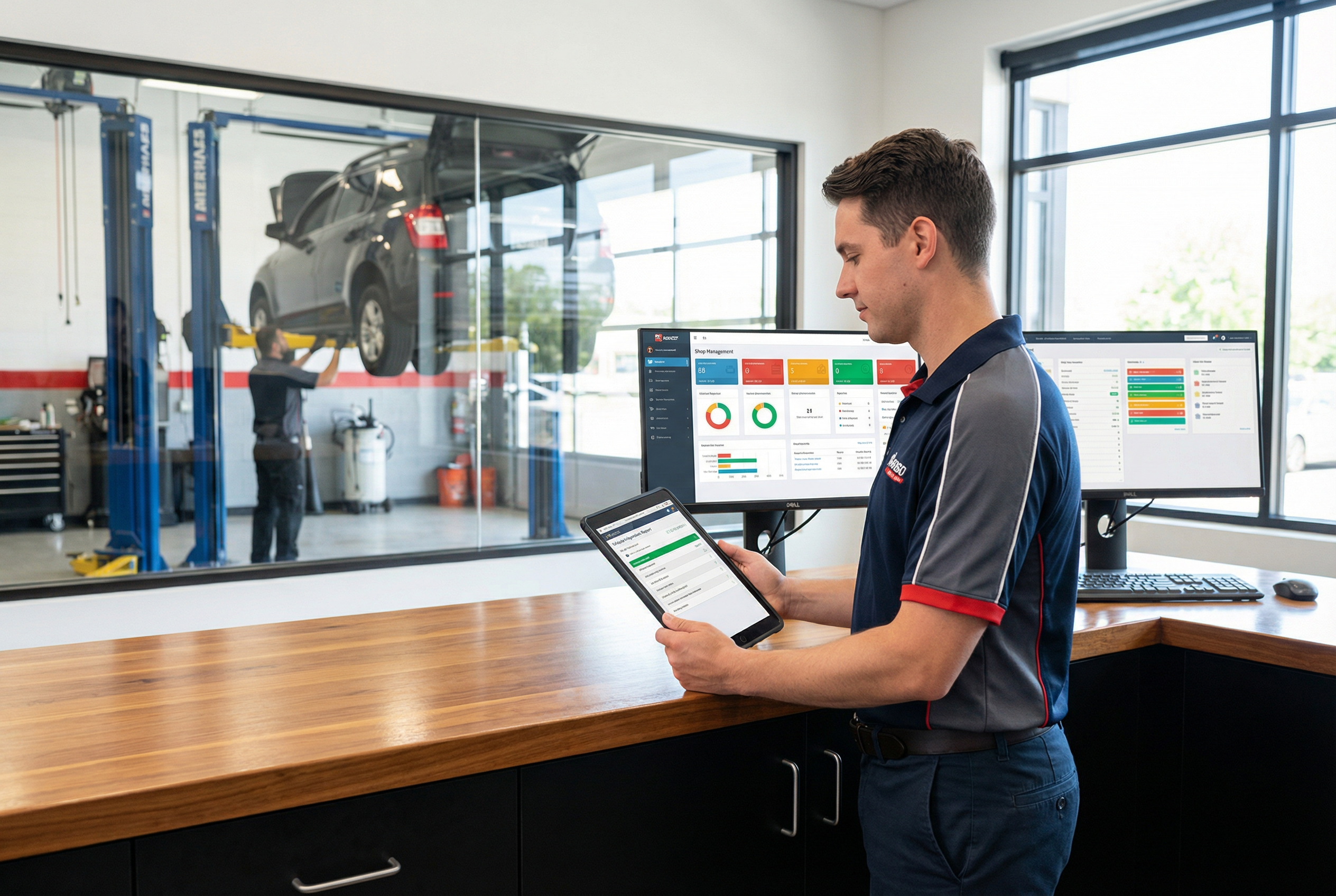
Job card management is the foundation. A digital job card is created at booking and follows the vehicle through your shop, tracking customer details, vehicle specs, services, parts, labor, and status in real-time.
Digital vehicle inspections transform customer communication. Technicians use a tablet to take photos and videos of worn parts, sending a visual report to the customer's phone. Customers can approve additional work with a click, building trust and boosting your average repair order.
The customer relationship management (CRM) features centralize all client information, including service history and notes, allowing for a personalized experience that turns one-time customers into loyal clients.
Quotes, invoicing, and payments are streamlined. The software pulls pricing from integrated parts catalogs for accurate estimates. It then generates an invoice automatically from the job card. Integrated payment processors allow customers to pay instantly, helping you get paid faster.
Reporting and analytics tools provide a clear view of your shop's health. Track job profitability, technician efficiency, and inventory turnover to make smart, data-driven decisions. More info about POS systems [blocked] shows how this ties into your overall management.
Essential Features for Inventory and Stock Management
Effective inventory management is crucial for profitability. A WMS prevents stockouts that delay jobs and dead stock that ties up cash.
- Automated Inventory Control: Track every part in real-time. The system knows what you have and can automatically generate purchase orders or alerts when stock is low. Some systems connect directly to supplier catalogs for one-click ordering.
- Supplier Management & Barcode Scanning: Organize vendor information to negotiate better deals. Speed up receiving and issuing parts by scanning barcodes to eliminate manual entry errors and keep counts accurate.
- Stock Visibility: Instantly know what's available to confidently book jobs. The software also identifies slow-moving parts, helping you reduce dead stock.
Your technicians' productivity directly impacts your bottom line. A WMS provides tools to keep them organized and efficient.
- Scheduling and Labor Tracking: Get a clear view of shop capacity, assign the right mechanic to the right job, and prevent scheduling conflicts. Technicians can clock in and out of specific jobs, capturing exact labor hours for accurate billing and real-time progress monitoring.
- Performance Monitoring: Use dashboards to track billed hours, efficiency ratings, and job completion rates. This data is invaluable for performance reviews and identifying training opportunities.
- Mobile Access: Technicians can use a smartphone or tablet to access job cards, perform digital inspections, and log time directly from their bay, saving time and improving accuracy.
Let's talk about what really matters—how workshop management software improves your shop's bottom line and daily operations. This is about solving the real problems that cost you time and money.
Every minute spent on manual tasks is a minute you're not earning revenue. Workshop management software automates repetitive work like scheduling and invoicing, freeing up your team to focus on revenue-generating activities. Shops using these systems see a 2-10% higher annual return, which can mean an extra $20,000 to $100,000 per year for a shop with $1 million in revenue. This boost comes from optimized scheduling, reduced wait times, and streamlined workflows.
Customer retention becomes easier with automated service reminders. A WMS also gives you full visibility over your operation, allowing you to solve bottlenecks before they cause delays. Finally, compliance and documentation are effortless, as every job detail is automatically recorded.
Learn how to run a successful auto repair shop [blocked] with systems that work for you.
Enhancing Customer Communication and Marketing
Clear communication is key to customer satisfaction. A WMS helps you deliver it without adding to your workload.
- Centralized Customer Database: Instantly access a customer's service history and preferences for personalized service.
- Automated Updates: Keep customers informed with automatic SMS and email updates throughout the repair process. This transparency builds trust.
- Digital Vehicle Inspections: Send customers photos and videos of needed repairs directly to their phone. Visual proof makes it easy for them to approve additional work, naturally increasing your average repair order.
- Service Reminders & Reputation Management: Use service history to send proactive maintenance reminders. Some systems also help you request reviews from satisfied customers.
[Explore automotive digital marketing [blocked] strategies]() that complement your software.
Using Data for Business Growth and Expansion
A WMS shows you exactly where your money comes from and where it goes, empowering you to make smarter business decisions.
- Profitability and Cost Analysis: Track profit margins on every job and identify key cost drivers. This knowledge helps you adjust pricing and promote profitable services.
- Data-Driven Decisions: Use real data on shop capacity, technician efficiency, and service demand to make informed choices about hiring, equipment purchases, and service offerings.
- Multi-Shop Management and Scalability: For businesses with multiple locations, a WMS provides a centralized view of performance. The software is scalable, growing with you as you expand.
- Business Intelligence Dashboards: Get a complete, at-a-glance picture of your business health with dashboards that display key metrics like revenue trends and customer retention rates.
How to Choose the Right WMS for Your Auto Repair Shop
Picking the right workshop management software is a critical decision that will shape your daily operations. Whether you're a small garage or a multi-location business, here’s what to consider to make a clear choice.
Start by evaluating these key factors:
- Business Size and Scalability: Choose a system that fits your current needs but can also grow with you. A scalable WMS saves you the headache of switching software as you expand.
- Budget and ROI: Look beyond the monthly fee and focus on the return on investment. If a system saves admin time and increases your average repair order, it quickly pays for itself. Use free trials to test the software before committing.
- Ease of Use: The best software is useless if your team can't use it. Look for clean interfaces and logical workflows that don't require extensive training.
- Customer Support: When issues arise, you need responsive and knowledgeable support. Look for providers with dedicated support teams and a reputation for being helpful.
- Data Security: Your customer and business data is sensitive. Ensure any provider, especially a cloud-based one, uses strong encryption, regular backups, and secure servers.
Key Integrations for a Seamless Workflow
The real power of a WMS is opened up when it connects with your other essential tools. Look for key integrations to create a smooth, unified workflow, such as:
- Accounting Software: Automatic syncing with platforms like QuickBooks or Xero saves hours of manual data entry and eliminates errors.
- Parts Ordering Catalogs: Connecting to supplier catalogs provides real-time pricing and availability, allowing you to build quotes faster.
- Payment Processing: Integrated payments let customers pay directly through the system, speeding up cash flow.
- Diagnostic Tools and Marketing Platforms: Advanced systems can pull trouble codes from diagnostic tools or integrate with marketing platforms to automate service reminders.
Join industry expert groups like RailVoice to share insights with other shop owners about technology and growth strategies. [blocked]
The Role of Mobile Apps and Cloud-Based Solutions
Modern shops operate beyond the front desk. Mobile apps and cloud technology allow you and your team to work more flexibly and efficiently.
Mobile app functionality lets technicians manage their work from the shop floor—clocking into jobs, performing digital inspections, ordering parts, and updating notes from a phone or tablet. This saves time and improves data accuracy.
Cloud-based systems mean you can manage your shop from anywhere. Check on operations from home, review quotes, or monitor multiple locations from your phone. Other benefits include real-time data sync for better communication, reduced IT overhead since the provider manages infrastructure, automatic updates, and improved security.
For most modern shops, a cloud-based WMS offers the best combination of accessibility, scalability, and cost-effectiveness.
| Feature | Cloud-Based WMS | On-Premise WMS |
|---|---|---|
| Accessibility | Access from anywhere, any device | Limited to office network/specific computers |
| Cost Structure | Subscription (monthly/annual), lower upfront cost | High upfront cost, ongoing maintenance |
| Maintenance | Handled by provider, automatic updates | Managed by shop, manual updates |
| Scalability | Easily scalable up or down | Can be complex and costly to scale |
| Data Security | Managed by provider, often robust | Dependent on internal IT capabilities |
| IT Overhead | Minimal | Significant |
| Integration | Often easier with other cloud services | May require custom development |
Frequently Asked Questions about Workshop Management Software
What is the typical cost structure for workshop management software?
Most modern workshop management software uses a subscription model, with monthly or annual fees for software access, updates, and support. This makes the cost predictable and avoids a large upfront investment.
Pricing is often tiered, with different plans for different needs. An "Essentials" plan might cover basics like job cards and invoicing for around $179/month, while "Pro" tiers with advanced features like digital inspections and multi-location management can cost $409 or more. Some systems charge per user, while others charge based on features.
Older, on-premise software may have a one-time license cost plus annual maintenance fees, but this model is becoming less common.
When evaluating cost, focus on return on investment (ROI). A system that saves administrative hours, reduces no-shows, and increases your average repair order is an investment, not an expense. The software often pays for itself within months, contributing to the 2-10% higher annual return seen by shops using these tools. Always use the free trial period(typically 14-30 days) to test the software in your shop before buying.
What types of workshops can benefit from this software?
Workshop management software is beneficial for a wide range of automotive businesses, including independent repair shops, dealerships, specialty service centers (e.g., tire shops, body shops), mobile mechanics, and even fleet maintenance operations. Essentially, any business that manages vehicle repairs, customer appointments, parts inventory, and technician workflows can significantly improve efficiency and profitability with a WMS.
How long does it take to implement workshop management software?
The implementation time for workshop management software varies depending on the complexity of the system, the size of your shop, and the amount of data migration required. Simple systems with basic features might be up and running in a few days to a week. More comprehensive solutions with extensive integrations and data transfer can take several weeks to a few months.
Most providers offer onboarding support and training to help your team get accustomed to the new system. It's crucial to allocate dedicated time for training and data setup to ensure a smooth transition and maximize the software's benefits.
Can workshop management software integrate with existing accounting systems?
Yes, most modern workshop management software solutions offer integrations with popular accounting systems like QuickBooks, Xero, and MYOB. These integrations are vital for streamlining financial operations, as they eliminate the need for manual data entry between systems, reducing errors and saving significant administrative time.
When choosing a WMS, it's important to verify its compatibility with your current accounting software to ensure a seamless workflow. Some advanced systems also integrate with payment processors, parts suppliers, and diagnostic tools, further enhancing efficiency.
What are the security measures for customer data in cloud-based WMS?
Cloud-based workshop management software providers typically implement robust security measures to protect customer and business data. These measures often include:
- Data Encryption: Data is encrypted both in transit (when being sent over the internet) and at rest (when stored on servers) to prevent unauthorized access.
- Regular Backups: Data is regularly backed up to multiple secure locations to prevent loss in case of system failures or disasters.
- Access Controls: Role-based access controls ensure that only authorized personnel can access specific types of data within the system.
- Physical Security: Data centers where the servers are hosted have stringent physical security measures, including surveillance, access restrictions, and environmental controls.
- Compliance: Providers often comply with industry-specific regulations and standards (e.g., GDPR, CCPA) to ensure data privacy and protection.
It's always advisable to review the security policies and certifications of any WMS provider before committing to their service to ensure your data is adequately protected.
Conclusion
Choosing the right workshop management software is a strategic decision that can significantly impact your auto repair shop's efficiency, profitability, and customer satisfaction. By understanding the core features, considering key factors like scalability and ease of use, and leveraging data for growth, you can transform your operations and stay competitive in today's digital landscape.
Remember, the goal is not just to adopt new technology but to implement a solution that truly streamlines your workflows, enhances communication, and empowers your business to thrive. Invest time in research, take advantage of free trials, and select a WMS that aligns with your unique needs and long-term goals. Your shop—and your customers—will thank you for it.
Ready to Transform Your Auto Shop?
If you're ready to take your auto repair business to the next level with a powerful workshop management software solution, contact Auto Shop Digital today. Our experts can help you navigate the options, choose the best system for your needs, and ensure a smooth implementation process. Let's drive your success forward! For a broader comparison of repair shop platforms including cloud-based and open-source options, see our guide to vehicle repair software [blocked]. And once your operations are running smoothly, our guide to automotive digital services [blocked] covers how to build the marketing layer that brings more cars through the door.
Published on: February 14, 2026
Digital Product Labs LLC Growth Friday SEO Managed SEO How it Works Pricing Blog FAQs About Us Contact Us Cancellation Policy Privacy Policy Terms of Service